
1. Overview
When managing intranet navigation, issues can arise if navigation is built directly from a SharePoint list. These problems are typically caused by incorrect or missing Parent IDs, which SharePoint does not always assign reliably.
The Involv Manager Navigation Tool is designed to prevent these issues by ensuring that navigation structures are created with correct parent-child relationships from the start. Using the navigation wizard significantly reduces errors and improves stability.
How to manage navigation from the Involv manager
If you do not have access to the Involv Manager, the Involv support team can assist by updating the navigation configuration for you.
2. What you’ll learn
After reading this article, you will understand:
-
Why SharePoint list–based navigation can cause errors
-
How incorrect Parent IDs affect navigation structure
-
Which navigation issues are commonly detected
-
Why the Involv Manager Navigation Tool is the recommended solution
-
What to do if you do not have access to the navigation tool
3. Common issues with SharePoint list navigation
When navigation is managed directly through a SharePoint list, the following issues may occur:
-
Incorrect Parent ID assignment
SharePoint does not always automatically assign the correct Parent ID, resulting in broken hierarchies. -
Circular looping
Navigation items can unintentionally reference each other, creating infinite loops. -
Duplicate name detection
Items with the same name at the same level can cause console warnings or errors. -
General navigation errors
These issues can surface as validation errors or broken navigation behavior.
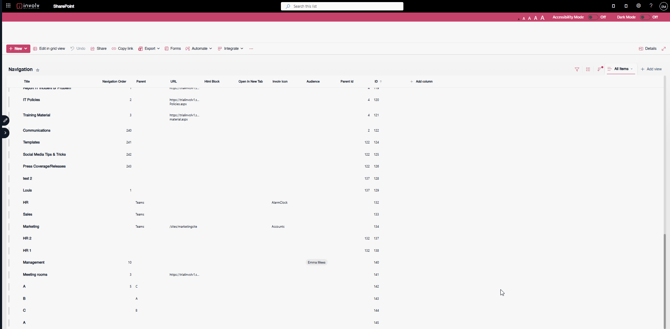
Example 1 – Circular parent-child loop
1 – A – Parent C
2 – B – Parent A
3 – C – Parent B
Logically, this structure is not possible. Each item ultimately becomes its own ancestor, which creates an impossible circular loop and results in navigation errors.
Example 2 – Duplicate level-1 names
1 – A –
2 – A –
3 – B – Parent A
In this case, multiple level-1 navigation items have the same name. This makes it unclear which “A” should act as the parent for item B, leading to validation and console errors.
4. Why use the Involv Manager Navigation Tool
The Involv Manager Navigation Wizard ensures that:
-
Parent-child relationships are always correctly defined
-
Circular references are automatically prevented
-
Duplicate names are detected and handled correctly
-
Navigation is validated before being published
As a result, navigation created via the Involv Manager is consistently reliable and free from the common issues seen with SharePoint list–based navigation.
For more information, see:
https://knowledge.involv-intranet.com/how-to-navigate-the-involv-manager
5. No access to the Involv Manager?
If you do not have access to the Involv Manager Navigation Tool:
-
Contact Involv Support
-
The support team will review and update the navigation configuration on your behalf to ensure correct Parent IDs and a stable structure
This ensures your navigation works correctly even without direct access to the tool.